One person building links for one client can keep the anchor profile in their head. That stops working as soon as two partners work on the same client in different markets, or one partner works on five clients at once. Each of them makes sensible choices on their own, and together they still end up with too many exact match anchors on the same page.
The usual fix is a sheet per client. It works until the sheet is a week behind, and by then the placements are already ordered.
Decide the mix before the sprint starts
An anchor plan has two parts. The first is the mix: which share of the links should carry which type of anchor. We work with five types:
- Branded: the brand name, with or without a product.
- Partial match: the keyword as part of a longer, natural phrase.
- Exact match: the keyword itself.
- Generic: words that say nothing about the topic.
- Naked URL: the address as the anchor.
Each type gets a target range per market, not one fixed number. A range leaves room for what a publisher will accept, and it still makes clear when a profile starts to lean.
The second part is the list of anchors itself, each tied to a target URL. Deciding those up front means the choice is made once, by someone who knows the client, and not again by every partner for every placement.
One anchor bank per market
All approved anchors of a client live in one bank, grouped per market and per type. The bank is loaded from the placement history, so it starts from the links that already exist and not from an empty list.
New anchors are proposed first and used only after they are approved. Anchors that are no longer wanted are rejected or archived instead of deleted, so it stays visible why an anchor is not used any more.
Check every new placement against the rules
A plan only helps when it is applied at the moment a placement is proposed. So the anchor of every new placement is checked against the anchor rules of that client. This is one of the quality gates: a partner who picks an anchor that does not fit sees that at once, with the reason.
Because every partner draws from the same bank and is checked against the same rules, the profile stays balanced without anyone reconciling sheets afterwards.
How it looks in ECHION
The Anchor Library shows the anchor bank per market. Each type shows its target range and the number of anchors in it, and each anchor shows its target URL, its source and its status: approved, proposed, rejected or archived. On the Dashboard, the anchor mix of the running sprint is set against the target range, so you see whether a client is on track before the sprint is over.
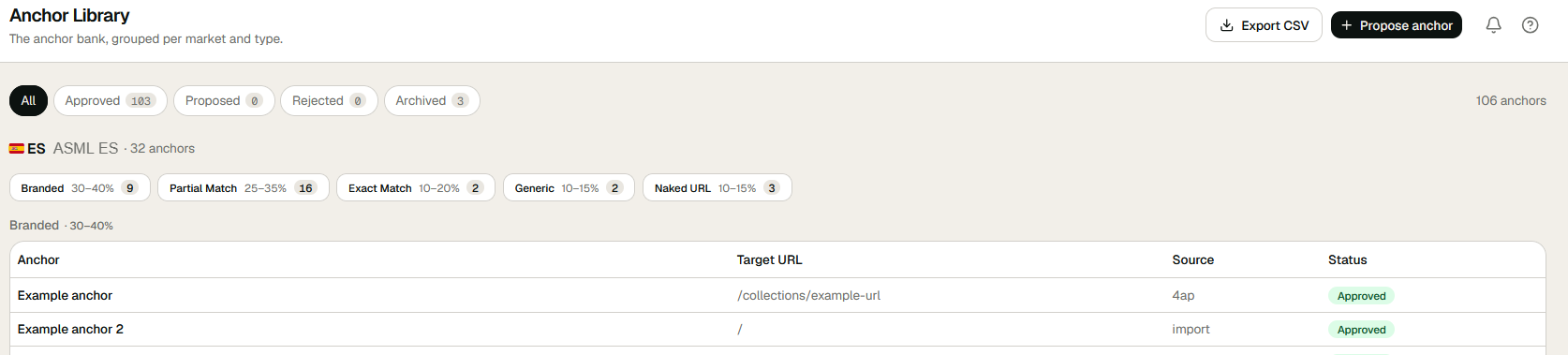
The Anchor Library is one of the modules of the platform. The anchor plan itself is set together with the target pages, which we describe in from target page to sprint.
More in the knowledge base, or see how the platform puts this into practice.