Most link building reports end at the same point: the list of links that went live. That is proof of delivery. It does not answer the question the client is actually asking, which is whether the page the links point to is doing better.
Answering that takes one more step, and it has to be the same step for every link.
Measure the target page, not the link
A link has no result of its own. What can change is the page it points to: its position, its clicks, its impressions. So the unit of measurement is the target page, and the data comes from Search Console, which is the source the client already trusts.
Per link we look at four figures of the target page: position, clicks, impressions and click-through rate.
The same window for every link
A comparison is only fair when it is made the same way every time. We compare the 28 days before a link was published with the 28 days after. A period of four full weeks evens out the difference between weekdays and weekends, and it is long enough for a new link to be picked up.
It also means a link is not measured too early. A link counts only when its window is complete. Until then it is listed, but it does not add to the totals. That keeps a report from looking better or worse than it is because half of the links are a week old.
What a client can read at a glance
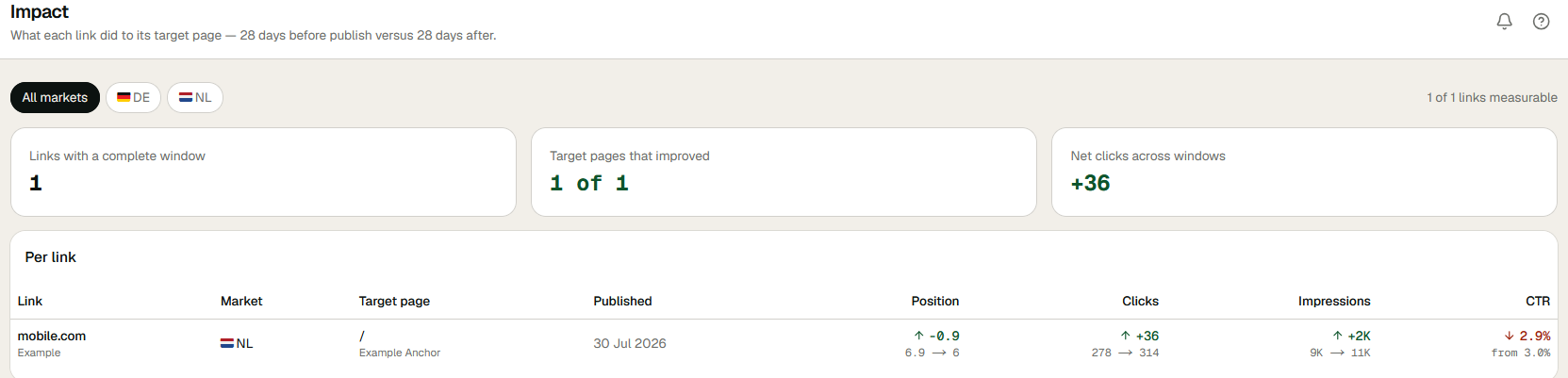
Per link is the detail. Above that, three figures summarise a period:
- Links with a complete window. How many links can be measured at this point.
- Target pages that improved. Of those, how many pages do better than before.
- Net clicks across windows. The difference in clicks, added up.
That is a summary a client can read without explanation, and it is built from figures they can check in their own Search Console.
Read it honestly
A comparison before and after is not proof that the link caused the change. Seasons shift, the page itself gets edited, a competitor drops out. One link with a better position says little. A pattern across many links and many pages says a lot.
It also shows what does not move. A target page that received several links and stays where it was is a reason to look at the page, not to buy more links for it. We find that as useful as the pages that improve.
Not every figure moves the same way either. More impressions with a lower click-through rate usually means the page now appears for more searches, including ones where it ranks lower. That is why the four figures are shown together.
How it looks in ECHION
Impact shows the three summary figures and below them one row per link: the publisher, the market, the target page, the publication date and the four figures before and after, each with the direction of the change.
Next to this, the publisher side of the result is covered in what AI citation data tells you about a publisher. What a client gets to see of all this is up to you, as described under roles on the platform page. Which pages were targeted in the first place is the subject of from target page to sprint.
More in the knowledge base, or see how the platform puts this into practice.